 the Facilitainer
How to improve Zoom video quality & audio
Zoom's default settings quietly reduce your video resolution and audio clarity, without you noticing. This free guide shows you exactly what to change.
Why your Zoom quality is worse than it should be
If you've ever wondered why your Zoom video looks off, it's almost never your camera or mic: it's the settings. Zoom sends video at only 640x360 to participants by default, even when your own self-view looks sharp, and if you use a virtual camera like OBS Studio, Ecamm, Camo, or Airtime, those defaults are working against you.
Audio has the same problem. Noise suppression, automatic leveling, and echo cancellation quietly degrade natural sound, and you won't notice during the call since you don't hear yourself the way participants do.
This guide is for facilitators, coaches, trainers, and educators who run regular Zoom sessions. No technical background needed: every step below shows the exact setting, where to find it, and what to change.
Want your whole setup looking and sounding professional, not just today's Zoom settings? A focused 60-minute 1:1 coaching session fixes whatever's actually holding it back.
Explore 1:1 coachingBefore you start
Two quick checks before touching any setting below.
Update Zoom
Before changing anything else, make sure Zoom itself is current.
- Open Zoom and click your profile picture, top-right.
- Select "Check for Updates" and install one if it's available.
Find Settings
Settings live in two places, depending on whether you're already in a call.
- Click your profile picture, top-right, and select "Settings."
- In a live meeting, open "More" in the toolbar and select "Settings" there instead.
Video settings
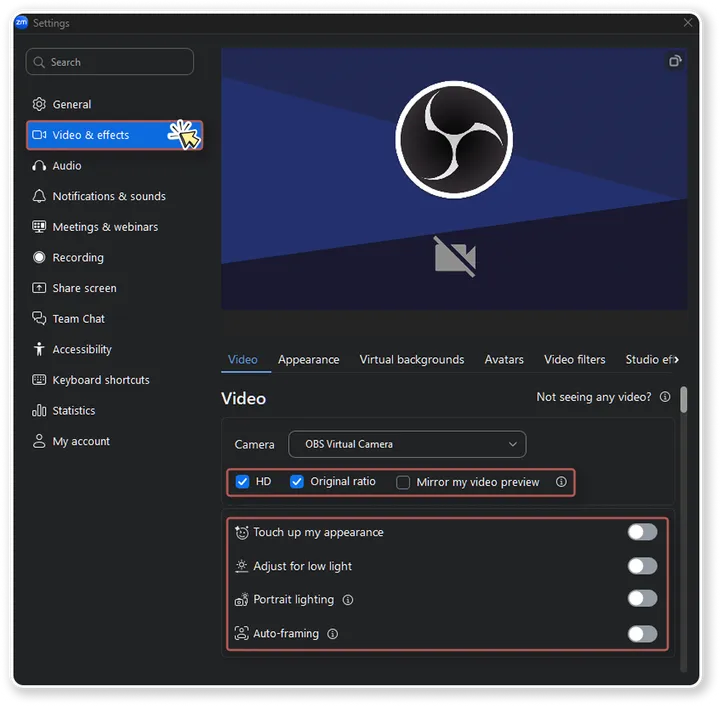
Open Zoom's Settings, go to Video & effects, and match these seven toggles.
- On.
HD Ensures the best available resolution.
- On.
Original ratio No stretching.
- Off.
Mirror my video preview Off avoids flipped text or logos in your self-view.
- Off.
Touch up my appearance Off avoids blur smoothing.
- Off.
Adjust for low light Off avoids random brightness changes.
- Off.
Portrait lighting Off avoids an artificial glow.
- Off.
Auto-framing Off keeps your framing manual, no surprises.
Turn on HD, then make Zoom actually use it
Checking "HD" in Video settings only asks for higher resolution. Zoom has to activate it on its side too, and that's an account-level setting most people never find.
Enable Group HD Video
Higher resolution requires an account-level setting. Available on paid Zoom plans only.
- Go to zoom.us and sign in.
- Open "Settings."
- Go to the "Meeting" tab.
- Go to the "Media Settings" section.
- Enable "Meeting-HD Video Quality."
Tip: use the search bar and type "Meeting-HD" to jump straight there.
Request server-side HD
Enabling the setting isn't always enough on its own: Zoom has to activate Meeting-HD for your account on their side too.
- Go to zoom.us and click "Support."
- Select "Contact Support."
- Choose "Web Case."
- Pick "Technical Support" as the request type.
- Fill in the ticket (template below), Product: Meetings, Area: Performance & Reliability.
- Ignore the suggested articles and click "I'm still having issues."
- Click "Submit support case."
Enable Meeting-HD for Zoom Meetings
Hello, I use OBS Studio for presentations in Zoom and have encountered resolution issues that affect quality. Please enable Meeting-HD in the backend of my account to improve video resolution. Thank you.
Dropdowns to match: Priority High · Product Meetings · Area Performance & Reliability.
Approval typically takes up to 48 hours. Check your email for a response from Zoom support.
Test your resolution
During a live meeting, once approved:
- Open "Settings," go to "Statistics."
- Select the "Video" tab.
- Check "Resolution" under "Send."
1280x720 or 1920x1080 means HD is actually working.
Zoom Pro tops out at 720p; Business, Education, and Enterprise plans can reach 1080p. Either way, at least one participant needs to be viewing in fullscreen, your network quality has to support it, and participant count can affect performance.
Audio settings
Open Settings, go to Audio, and match these against your own microphone panel.
Microphone Select your external mic, not your laptop mic.
Input volume Set to roughly 90%.
- Off.
Automatically adjust microphone volume Off avoids sudden level jumps.
- On.
Original Sound for Musicians Bypasses Zoom’s audio processing.
- On.
High-fidelity music mode Better audio quality on top of Original Sound.
- Off.
Echo cancellation Only turn on if you are not wearing headphones.
Why I created this Zoom Optimization Guide
I run virtual workshops and online trainings almost every day.
After hundreds of Zoom sessions, I refined the settings that consistently produce clearer video and more natural audio.
This guide summarizes the exact configuration I use for my own sessions. If you want to go further, my Gear List for Virtual Facilitators covers the equipment side.