
Free LinkedIn™ post date & time extractor
Also called the LinkedIn™ Post Time Wizard.
LinkedIn™ doesn't display the publish date, but it never stopped storing it: the post's own link carries that time with it. Paste any post link below and this page reads the exact date and time back out in your own timezone, no login, no extension.
Click the field, paste your own link, and press the button.
How to find the exact date of a LinkedIn™ post
Paste the link above and this page reads the exact date and time back out in your timezone. No login, no extension.
- 1
Copy the post link
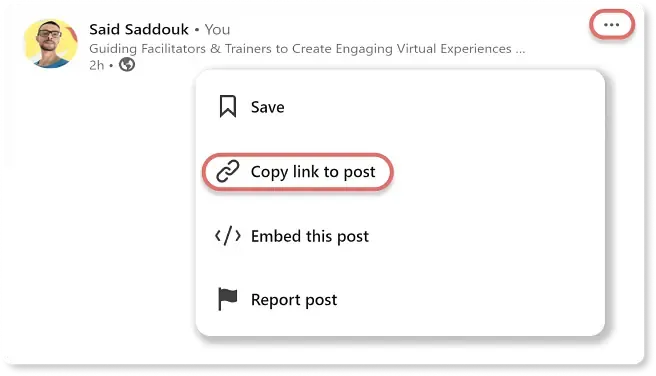
Open the post on LinkedIn™. Click the three dots (⋯) at the top right, then Copy link to post. This is the step people get stuck on, which is why there is a screenshot of it below.
- 2
Paste it over the example
Click the field above. That selects the example link, so pasting yours replaces it.
- 3
Press the button
The date and time appear straight away in your own timezone, and the post itself loads underneath so you can check you got the right one.
Where the next one of these shows up first
I built this because I kept needing it. Same reason behind most of what I send out: small, practical things for people who run sessions online. Roughly once a week.
No form? Open the signup page directly on Kit. (Ad-blockers might be hiding it.)
Only value, no spam. Unsubscribe anytime.
Why LinkedIn™ hides the time
LinkedIn™ shows relative labels ("3 days ago", "1w", "1mo") and leaves the actual timestamp out of the interface. That becomes a problem the moment the date is the thing you need: checking whether a claim predates an announcement, sourcing a post for a report, pinning down when a competitor actually shipped.
The time never left the data, only the screen. It's carried inside the post's own link, and this page reads it back out on your own device, without a request to LinkedIn™ and without logging in.
The post ID is fixed the instant the post goes live, so the date can't drift and can't be quietly changed later. Visibility settings don't affect it either: a post you have no way of opening will still give up its date.
Any LinkedIn™ post link works, whichever shape you copied it in: a /feed/update/ URL, a /posts/ permalink, a shortened lnkd.in link, or a bare post ID on its own if that's all you were given.
What the LinkedIn™ date checker does
Six things it does:
Exact date and time
Down to the minute, not "3 days ago". No timezone arithmetic on your end.
Your timezone
Converted to wherever you are, read from your browser. Nothing to set.
One-tap copy
Click the result or the copy button and the timestamp is on your clipboard, ready to paste into a doc or a report.
Post preview
The LinkedIn™ post loads under the timestamp, so you can confirm you checked the post you meant to.
Nothing leaves your browser
The date is decoded from the URL on your own device. No link, timestamp, or post data is sent to a server.
Works on a phone
Paste a link straight out of the LinkedIn™ app and read the timestamp on the same screen.
Frequently asked questions
Is the LinkedIn™ Post Time Wizard free?
Yes. There is no account to make and no limit on how many posts you check.
How can I tell when a LinkedIn™ post was made?
LinkedIn™ only shows you a relative label ("3 days ago", "1mo"), but the exact publish time is sitting inside the post URL. Paste the link into the field at the top of this page and the full date and time appear in your timezone.
Why doesn't LinkedIn™ show the exact publish time?
Relative timestamps keep the feed reading cleanly, and for casual scrolling they are enough. The precise time was never removed from the data, only from the interface. That is why it can still be recovered from the link.
Can I get the timestamp from a LinkedIn™ activity ID?
Yes. Paste the activity ID on its own, a share or ugcPost URL, or the whole post link. Any of them work, and the date and time come back straight away.
How accurate is it?
To the millisecond. The ID is minted at the moment the post is created, so the date cannot drift, and it cannot be backdated after the fact.
Is this a scraper?
No. A scraper goes and reads the post; this only reads the link you pasted. Nothing is crawled and no account is signed into, which is why the answer comes back instantly and why it still works on posts you cannot open yourself.
Does it need an extension or a plugin?
Nothing to install. Copy the URL, paste it, press the button.
Will it work on my phone?
Yes. Paste the link from the LinkedIn™ app and tap the button. Any device with a current browser will do.
Is my data stored or shared?
No. Everything happens inside your browser. The link you paste never reaches a server of mine, and neither does anything worked out from it.
Does it work on private LinkedIn™ posts?
The date comes out of the post ID, so visibility settings make no difference to it. The preview underneath may fail to load for a private or restricted post, but the date and time still appear.
What if the LinkedIn™ URL doesn't work?
Check that you copied the post link itself (three dots, then Copy link to post) rather than a profile or company page URL, since those carry no post ID. Shortened lnkd.in links work too; they take a second longer while the real URL is resolved.
Connect on LinkedIn™
If the tool was useful, the posts it's been running on are over here.
Connect with me on LinkedIn™There are a few more of these on the Resources page: a countdown timer for OBS and Ecamm, a lorem ipsum generator, and the Zoom Optimization Guide if your calls need to look and sound better.