
Free LinkedIn™ Post Time Extractor
A free tool that decodes the exact timestamp from any LinkedIn™ post.
Paste a link, get the publish date and time. Ready in under 5 seconds.
Loading tool...
How to Extract a LinkedIn™ Post Timestamp
Get the exact publish time of any LinkedIn™ post in three steps:
Copy the post link
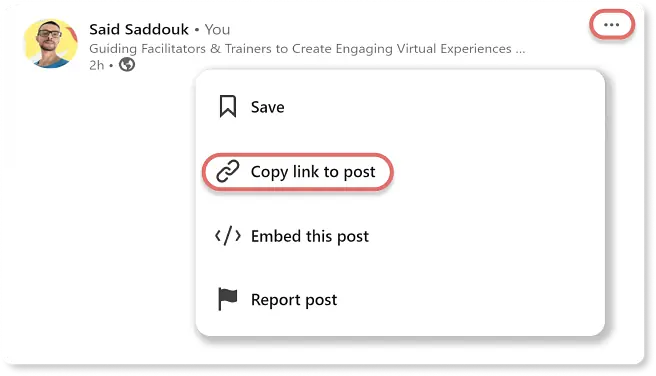
Go to the LinkedIn™ post. Click the three dots (…) at the top right and select Copy link to post.
Paste it above
Drop the URL into the field at the top of this page. Press Enter or click Get LinkedIn™ Post Time.
Get the timestamp
The full date and time appear instantly, converted to your local timezone. The post preview loads below to confirm the content.
Why LinkedIn™ Hides the Time
LinkedIn™ replaced precise timestamps with relative labels like "3 days ago" or "1 week ago." Convenient for casual browsing. Useless if you need the actual publish time for reporting, scheduling analysis, or content audits.
Every LinkedIn™ post ID encodes the exact publish timestamp in its first 41 bits, a design inherited from Twitter's Snowflake ID system. The LinkedIn™ Post Time Wizard reads that ID directly from the URL and decodes it client-side. No API call. No login. No server involved.
The result is the exact UTC moment the post was submitted, converted automatically to your device's timezone. Down to the minute. Every time.
Running virtual events or workshops? The Zoom Optimization Guide covers how to upgrade your setup from lighting to audio to camera positioning.
Everything in One Click. No Account Needed.
Everything you need to pull the exact timestamp from any post:
Exact Timestamp
Down to the minute. No more "3 days ago" guessing or manual timezone math.
Auto Timezone
Converts automatically to wherever you are. No settings, no dropdowns, no configuration.
Post Preview
The full LinkedIn™ post loads below the timestamp so you can confirm content and date at a glance.
Instant
No API call, no server, no waiting. The timestamp is decoded directly from the post URL in your browser.
Private
Nothing is stored or sent anywhere. Your links stay on your device. Zero data collection.
Mobile Ready
Paste a link from the LinkedIn™ app on your phone and get the timestamp instantly on any device.
No account, no watermark, no time limit.
Frequently Asked Questions
Connect on LinkedIn™
Want to stay in the loop or just say hi?
Connect with me on LinkedIn™Curious how to make your virtual calls look and sound way better? Check out the Zoom Optimization Guide, packed with tips to upgrade your setup.